Assistive Technology
We Have Moved!
Wayne RESA Annex Building
5454 Venoy Rd, Wayne, MI 48184
Room 161
This is the first room on the left right after the reception area.
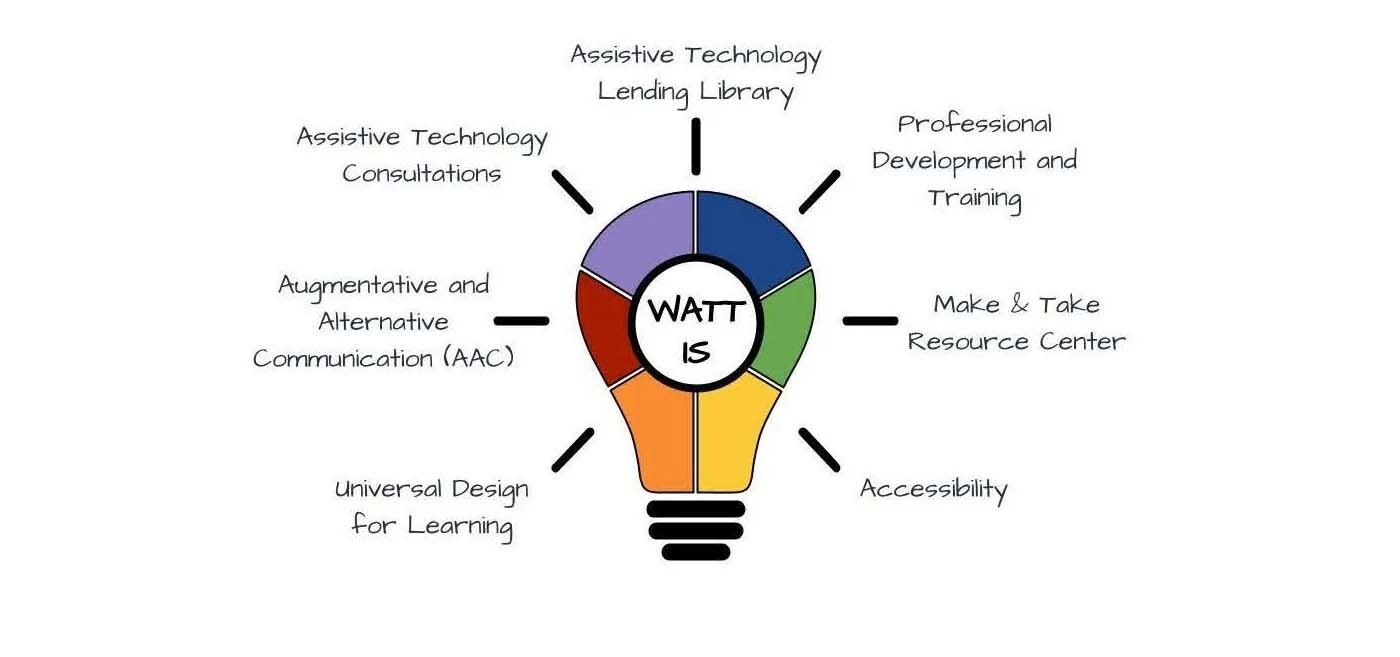
The Wayne Assistive Technology Team (WATT) provides assistive technology devices and services to local districts and public school academies in Wayne County.
Pick up and Drop off
Pick up and Drop off appointments can be made using our Online Scheduler(opens in new window).
Make & Take Sign Up
Make and Take appointments can be made using our Online Scheduler(opens in new window).
For large groups looking to schedule half-day or full-day sessions, please email us at wattsupport@resa.net or give us a call at (734) 334-1701.
Contact WATT
The Wayne Assistive Technology Team (WATT) is available to provide consultations and Assistive Technology equipment loans to students across Wayne County who have a moderate to severe disability. Additionally, WATT is happy to help support Wayne County school teams in building capacity and growing their overall knowledge around Assistive Technology (AT) and Augmentative and Alternative Communication (AAC).
WATT Trial and Loan Orientation Module
Before requesting a new Assistive Technology (AT) trial or renewing an existing loan during the 2025-2026 school year, all educators requesting an AT trial or renewing an existing loan are strongly encouraged to complete a brief WATT Trial and Loan Process Module. This short training ensures teams are familiar with the trial and loan process, responsibilities, and available supports.
First Time Contacting WATT or Using the New Platform?
In order to submit a request, you must first create a RESA service desk account (powered by Jira). This is FREE and needs to be done only ONCE using your school email address. After you have an account, you will be able to view all of your requests, make additional comments to the WATT team, and receive quick updates about the status of your request.
Make Assistive Technology Requests and Updates
Use the link below to select the ticket type to support your needs
 Consultation: Request a meeting with an AT Consultant to chat about your student and their needs to begin brainstorming possible AT Solutions.
 Lending Library: If you know the AT you want to try with your student and are ready for a trial.
 Loan Transfer: If you need a student’s Assistive Technology loan to be transferred into your name.
 Repairs: If a device needs repair, is broken, or requires updates (e.g., app installation or software reconfiguration).
Guidelines and Guidance Documents
Core Vocabulary Boards
Here are PDFs of the Wayne County Core Vocabulary boards. The 48 and 108 versions have different styles: b = black background, w = white background, r = rounded corners, and s = square corners. Additionally, there are versions of the Wayne County Core Vocabulary Board with pragmatic indicators on the right side, as well as a variety of translated versions of the Core 108 boards.
- 48 High Contrast(PDF, opens in new window)
- 48 br(Black background, Rounded corners, PDF, opens in new window)
- 48 wr(White background, Rounded corners, PDF, opens in new window)
- 48 ws(White background, Square corners, PDF, opens in new window)
- 108 br(Black background, Rounded corners, PDF, opens in new window)
- 108 wr(White background, Rounded corners, PDF, opens in new window)
- 108 ws(White background, Square corners, PDF, opens in new window)
- Core with Pragmatics(PDF, opens in new window)
Translated Core Communication Boards
Assistive Technology Decision Making Tools
- SETT (Student, Environment, Tasks, Tools) Form(Google Doc, opens in new window) — Used by WATT for consultation and consideration.
- How to Fill Out the SETT(Google Doc, opens in new window)
- WATI Forms & Sample Evaluation Forms(opens in new window) — Wisconsin Assistive Technology Initiative resources.
- QIAT Matrices and Indicators(opens in new window)
- Sample Data Collection(opens in new window) — From the QIAT Resource Bank.
- AEM Navigator from CAST(opens in new window) — A process facilitator that guides teams through an individual student’s need for specialized formats of instructional materials.
- uPAR (Universal Protocol for Accommodations in Reading)(opens in new window) — Provides data to show how each student learns best by comparing independent reading to listening with accommodations.
- SIFTS (Select Inventory of Technology Support)(opens in new window) — A tool to assist school teams in matching a student’s needs with assistive technology features.
Accessibility Resources
Accessibility Resources
Accessibility means designing materials and environments so that everyone—including people with disabilities—can access information, participate in activities, and benefit from services equally. It ensures that all users can reach, understand, and use what’s provided.
Built-in Accessibility for Operating Systems and Browsers
Explore the built-in accessibility tools available on various platforms that support all learners. These features are designed to promote independence, engagement, and access for students with a wide range of needs.
- iOS Accessibility Guide(opens in new window)
- iOS Accessibility Presentation Slides(Google Slides, opens in new window) — Created by a Wayne RESA AT Consultant to highlight tools for everyday instruction.
- macOS Accessibility(opens in new window)
- Android Accessibility(opens in new window)
- Windows Accessibility(opens in new window)
- Google Chrome Accessibility Features and Products(opens in new window)
- Guardian’s Guide to Google Tools for Children with Disabilities(Google Doc, opens in new window)
Video Conferencing Accessibility
Assistive Technology Reference Website
- QIAT (Quality Indicators for Assistive Technology)(opens in new window) — A national listserv and resource hub for assistive technology quality standards.
- OCALI (Ohio Center for Autism and Low Incidence)(opens in new window) — Provides leadership, training, and professional development to improve outcomes for individuals with autism and low-incidence disabilities.
- WATI (Wisconsin Assistive Technology Initiative)(opens in new window) — Offers extensive free publications regarding AT consideration and assessment.
- Region IV Assistive Technology Consortium(opens in new window) — Regional resources and guidelines for Michigan educators.
- Alt+Shift(opens in new window) — Collaborates with districts to create accessible educational environments through professional learning and technical assistance.
- ATIA (Assistive Technology Industry Association)(opens in new window) — The collective voice of the AT industry, ensuring the best products and services reach people with disabilities.
- CTG (Closing the Gap)(opens in new window) — A world leader in assistive technology news, resources, and professional development.
- HIAT (High Incidence Accessible Technologies)(opens in new window) — Applies Universal Design for Learning (UDL) principles to help classroom environments incorporate technology options for all students.
Assistive Technology Resources
Free Resources
- Monarch Reader(opens in new window) — A collection of free, easy-to-read, and accessible books. Features include speech support and compatibility with touch screens, custom overlays, and switches.
- Tar Heel Reader(opens in new window) — Accessible books across many topics with multiple interface options (touch, switch, IntelliKeys). Users can also create and publish their own books.
- Shared Reader(opens in new window) — A shared reading interface from Tar Heel Reader designed to help adults engage students more actively with texts.
- Bookshare(opens in new window) — An accessible library for students with learning and print disabilities, featuring over 815,000 titles.
- Learning Ally(opens in new window) — Provides a human-voice audiobook library for individuals with dyslexia, visual impairments, or motor impairments.
- Newsela(opens in new window) — Thousands of leveled reading materials and news articles to support literacy across all core curriculum areas.
- Rewordify(opens in new window) — A tool that simplifies complex text instantly to help with reading comprehension.
- Tween Tribune(opens in new window) — Smithsonian-powered educational service providing articles at multiple Lexile levels, videos, and photos.
- GCF Global: Accessibility Features(opens in new window) — Tutorials for using built-in accessibility tools across various technology platforms.
- AT & AEM Center (OCALI)(opens in new window) — Information on matching AT features to specific devices for trials and implementation.
- n2y Knowledge Base(opens in new window) — Support and information for News-2-You, Unique Learning System (ULS), SymbolStix Prime, and more.
Augmentative and Alternative Communication (AAC) Resources
- What is AAC and Core Vocabulary?(Video, opens in new window) — A 40-minute introductory training by Laura Begley (WATT) reviewing the basics of AAC and Core Vocabulary.
- ASHA: General Information about AAC(opens in new window) — The American Speech-Language-Hearing Association provides evidence-based resources and general information regarding AAC.
- Communication Bill of Rights(opens in new window) — A document from the National Joint Committee outlining the basic human communication rights for persons with severe disabilities.
- CommunicationFIRST(opens in new window) — A nonprofit dedicated to protecting the civil rights of individuals who use AAC, led by people with lived experience.
- PrAACtical AAC(opens in new window) — A blog community providing resources to improve communication and literacy for those with significant communication difficulties.
- Project-Core(opens in new window) — A federally funded project offering modules and resources for universal core vocabulary implementation in schools.
- Stepping into AAC(opens in new window) — A free 20-week toolkit with weekly videos and activities to help families and teams start their AAC journey.
- AAC Institute(opens in new window) — A resource focused on enhancing communication through service delivery, research, and evidence-based clinical practice.
- ISAAC (International Society for AAC)(opens in new window) — A global membership organization working to improve the lives of children and adults with complex communication needs.
- The Communication Matrix(opens in new window) — An online assessment tool for individuals in the beginning stages of communication, assessing expressive language and behavioral communication.
Quick Guides/Training Modules on Assistive Technology Tools
- Boardmaker Learning Resources(opens in new window) — Provides free recorded web training sessions to help you become a Boardmaker expert.
- Don Johnston Webinars & Support(opens in new window) — Offers how-to videos and printable PDFs for Snap & Read, Co:Writer, uPAR, Quizbot, Readtopia, and more.
- Inclusive Technology Professional Development(opens in new window) — Free online professional development sessions on various AT tools.
- Tobii Dynavox Support & Training(opens in new window) — Live and recorded webinars for eye gaze devices, Windows software, and iPad apps like Snap + Core and Communicator 5.
- OCALI Assistive Technology Training Modules(opens in new window) — Comprehensive online training modules for AT implementation.
- AbleNet Webinars(opens in new window) — Video training and webinars covering all AbleNet products.
Translated Communication Boards
Universal Design for Learning (UDL)
- CAST (Center for Applied Special Technology)(opens in new window) — A nonprofit R&D organization that created the Universal Design for Learning framework to make learning more inclusive worldwide.
- Learner Variability Navigator(opens in new window) — A free tool that provides research-based strategies to support the whole learner and create better learning experiences.
- UDL-IRN (Implementation and Research Network)(opens in new window) — A grassroots organization supporting the scaled implementation and research related to Universal Design for Learning.
For individuals with disabilities, Assistive Technology (AT) improves access to education, employment, independent living, recreation, and participation in the community. The importance of assistive technology is at the heart of the Assistive Technology Act of 2004(opens in new window).
The AT Act promotes awareness and access to assistive technology devices and services.
The Assistive Technology Act of 2004 defines "AT Device" and "AT Service" as follows:
AT Device
An AT Device is any item, piece of equipment, or product system—whether acquired commercially off the shelf, modified, or customized—that is used to increase, maintain, or improve the functional capabilities of individuals with disabilities.
AT Service
An Assistive Technology Service means any service that directly assists a child with a disability in the selection, acquisition, or use of an assistive technology device. The term includes:
- Evaluation: Assessing the needs of a child with a disability, including a functional evaluation in the child's customary environment. (An in-district team will conduct the evaluation with support from WATT, if needed.)
- Acquisition: Purchasing, leasing, or otherwise providing for the acquisition of assistive technology devices.
- Customization & Maintenance: Selecting, designing, fitting, customizing, adapting, applying, maintaining, repairing, or replacing assistive technology devices.
- Coordination: Coordinating and using other therapies, interventions, or services with assistive technology devices, such as those associated with existing education and rehabilitation plans.
- User Training: Training or technical assistance for a child with a disability or, if appropriate, that child's family.
- Professional Training: Training or technical assistance for professionals, employers, or other individuals substantially involved in the major life functions of that child.
Considering a Student's Need for Assistive Technology
The Individuals with Disabilities Education Act (IDEA) of 2004(opens in new window) states that Assistive Technology must be considered annually for every student with a special need. The outcomes of the consideration process then become part of the student's Individualized Education Plan (IEP).
The need for assistive technology may be indicated when a student is:
- Having difficulty achieving their IEP goals and objectives.
- Struggling to participate in classroom activities.
- Not making progress in the general education curriculum.
Professional Development
Stay Connected
This sign-up is for school and district staff working in special education. Use this Google Form , select the email lists that match your role and interests to receive timely updates, resources, and professional learning opportunities.